
- Player and Party Icons
- As seen in the upper left corner, these display the class, level, health and mana/energy of your character.
- Maps
- The upper right mini-map can be expanded to show the world-view of where your character is located.
- Chat and Combat Log Windows
- The bottom left and right display the various chat channels (world, party, trade, guild, etc) and the combat log.
- Spell Bars/Buttons
- The bars on the bottom and right hand side of the screen can be configured with various spells and abilities that you use frequently. These buttons can be bound to certain key combinations.
- Cast Bars
- These are not shown in the picture above, these bars display the length of various casting abilities.
- Player/NPC Health Bars
- The bars shown on top of the other players, in the picture above, display their health and mana and are useful to help target specific enemies while in battle.
These add-ons required constant tweaking and each one of my ten characters had to be configured individually. When these add-ons updated, there were often conflicts which required me to remove certain conflicting modules. When I installed a new operating system or moved to a new computer, I had to spend hourse reconfiguring these all over again. It was a mess.
At some point I realized that it would be easier to take a pre-configured suite of working add-ons that is well maintained and used by other players. So I reviewed certain suites of user-interface add-on compilations and settled upon MazzleUI.

So I went back to the default UI and a few essential add-ons that I had to maintain and configure on my own. A few months went by and I continued my search for the best compilation that worked for my style of gameplay and best suited the conveniences I enjoyed. At some point I found ArkiveUI. Arkive picked up where Mazzle left off and designed a user interface based upon the same design principles.
I was thrilled to discover the large user base, the support forums, the updated add-ons and in-game setup wizard that made this compilation so successful.
With the ArkiveUI I came, saw and conquered bosss after boss throught the Burning Crusade edition (Magtheridon, Gruul, Serpeantshire Cavern, Black Temple, Sunwell) and well into the next expansion (Naxxramus and Ulduar) and even most recently into the Wrath of the Lich King (Trial of the Crusader and Icecrown Citadel).

However, I found that no matter what I tried, when I was in a large raid (25+) I could not get good frame rates. I upgraded my computer's graphics card, CPU, hard drive and still was stuck at 10 frames per second when at 1920x1280 resolution, regardless of the graphics quality and anti-aliaising.
I followed multiple threads on the ArkiveUI Forums and found a few tips, mostly dealing with disabling certain add-ons and reloading the UI. While this worked, I had to then re-enable those addons after the raid and it was quite a hassle. Even with half of the add-ons disabled, my frame rates did not improve substantially and never went above 20 fps in a big raid with lots of UI elements (e.g. Onyxia whelps). I even tried throwing the latest and greatest hardware at the problem and built my own uber-gaming-pc with the latest and greatest CPU, GPU, memory and SSD, to no avail. Finally, with head hung low in sorrow, I went in search of a new compilation that would boost my frame rates and allow me to do more in raids (more dps, fraps while raiding, stream the UI online, etc).


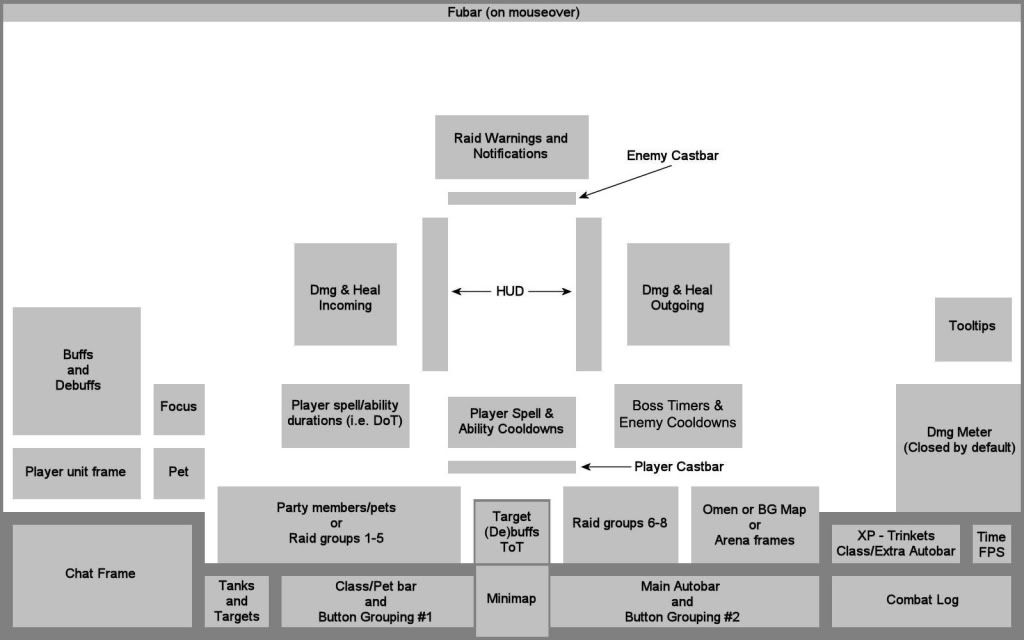
I have added other add-ons here and there as needed to make life easier. I have a back-burner TO-DO, to get it all zipped up and generalized so that I can share this with others, but in all honesty, the as-is BodaUI is very straightforward and can be tweaked easily for ones own liking.
I encourage others to check this out. Boda wrote this primarily for Protection specced Warriors, this is seen most readily in the out-of-the-box configuration of the SBF filters. However, these serve as a great guide for how to best configure this addon and others to benefit the other classes you play. I have added filters to support the various roles I serve in my adventures and I found it to make my gameplay better.
